

Analysis Typology Coder
Purpose-built software for Analytical Quality Management
The Analysis Typology Coder (ATC) is a specialised software environment for the systematic assessment of expert analytical outputs and academic manuscripts. Built around the proprietary frameworks and methodological protocols of Analysis Excellence, ATC transforms complex qualitative assessment into a structured, transparent and reproducible process.
Rather than generating or improving content for the user, ATC is designed to help users understand the quality and underlying characteristics of work that already exists—from individual texts to recurring patterns across larger bodies of analytical and scholarly output.
Turning Analytical Quality Management into Practice
Analytical Quality Management (AQM) treats analytical and scholarly quality not simply as a characteristic of individual texts, but as something that can be systematically assessed, diagnosed, developed and monitored over time. It complements established mechanisms such as professional judgement, editorial review and peer review by adding a structured and cumulative layer of assessment.
ATC provides the software infrastructure through which this approach can be put into practice. It operationalises our conceptual frameworks and methodological protocols, enabling assessments to be conducted consistently, documented systematically and accumulated into structured evidence. In this way, individual assessments can contribute to a broader understanding of analytical or scholarly performance.
A Structured Environment for Complex Qualitative Judgement
ATC combines fixed methodological architecture, protocol-bound AI-supported interpretation and human judgement within a single assessment environment.
The software guides each assessment through predefined methodological pathways. Concepts, categories, assessment criteria and decision rules are established by the underlying methodology rather than generated by AI. AI is used selectively where interpretative analysis is required, while validation mechanisms and human review support cases requiring additional judgement.
The result is not simply a score. ATC produces a structured diagnostic record designed to make the reasoning behind assessment more visible and the results more useful for comparison, development and longer-term quality management.
What ATC Does
Analytical Quality Management (AQM) treats analytical and scholarly quality not simply as a characteristic of individual texts, but as something that can be systematically assessed, diagnosed, developed and monitored over time. It complements established mechanisms such as professional judgement, editorial review and peer review by adding a structured and cumulative layer of assessment.
ATC provides the software infrastructure through which this approach can be put into practice. It operationalises our conceptual frameworks and methodological protocols, enabling assessments to be conducted consistently, documented systematically and accumulated into structured evidence. In this way, individual assessments can contribute to a broader understanding of analytical or scholarly performance.
What ATC Does Not Do
ATC is not an AI writing assistant, proofreading application, automated editor, summarisation tool or generic manuscript scorer.
It does not write analysis or scholarship on behalf of the user, and it is not designed to replace professional judgement, editorial review, peer review or substantive expertise.
Its purpose is different: ATC provides a structured environment for analytical and scholarly quality. AI-supported interpretation operates within predefined methodological boundaries and supports the assessment process rather than determining its standards.
This distinction is central to the product.
Use ATC Independently—or Together With Our Expertise
ATC is available as standalone licensed software, enabling clients to conduct assessments internally using our embedded methodologies.
For organisations seeking external diagnosis, interpretation or development support, Analysis Excellence also provides Analytical Performance Reviews, Academic Manuscript Diagnostics, tailored development workshops, core development workshops, organisational implementation and strategic advisory services.
These professional services are commissioned separately from the ATC software licence.
Flexible ATC Licensing
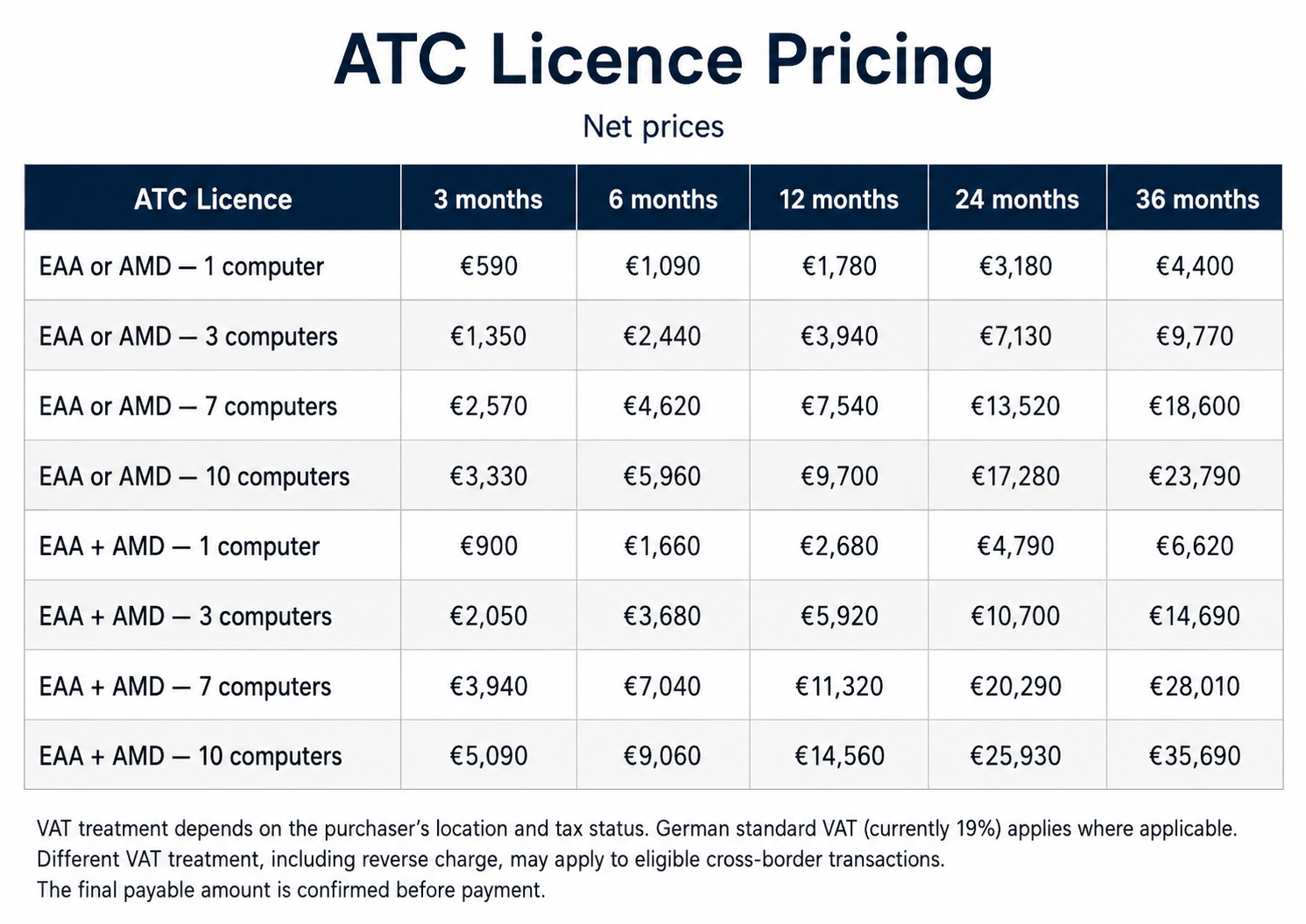
ATC is available through flexible licensing for both individual professionals and organisations. Users may licence the EAA module, the AMD module, or both, with options for different licence periods and numbers of authorised computers. Longer-term and multi-computer licences are available at preferential rates, while larger institutional deployments can be tailored to specific organisational requirements.
The table below presents prices, excluding VAT, for single-computer licences of either one module or the complete EAA + AMD package for 3, 6 and 12 months. These prices cover software access only and do not include training in the use of ATC.
Try ATC Free Now!
Every ATC installation includes free access to both assessment environments, allowing prospective users to experience the software and its methodological approach before purchasing a licence.
10 free EAA assessments
for expert analytical outputs
10 free AMD assessments
for academic manuscripts
No paid licence is required to use these initial assessments. Once the free assessment allowance has been used, users can select the module and licence period that best fits their needs.
For pricing enquiries, licensing questions or assistance with installation, please contact us through our Contact Form.
The download below is for macOS (Apple Silicon) only. ATC for Microsoft Windows will be available soon.
Based in Germany and purchasing a single-computer licence?
Use our Fast-Track Purchase option to select your licence, pay directly by PayPal and complete your licence registration immediately afterwards.
Have you installed ATC but are unsure how to configure the AI connection — or would you like to understand the setup in advance?
The ATC AI Integration Guide explains how to configure the OpenAI API or LM Studio, obtain and securely use an API key, select an appropriate local model, and match local AI use to your computer’s capacity. It also covers privacy, reproducibility and recommended configurations for professional and institutional use. Download the guide for clear, step-by-step setup instructions.